I'm really happy to see these detailed suggestions & improvements, they're really useful.
Squiggle is still an early language, there are definitely a lot of fixes for things like these to be done.
Quick question: > This is the primary reason I wasn't able to completely verify the Squiggle model against Causal
Any harder numbers here would be really useful, to get a better sense. I just looked at this model, which takes me a few seconds to render. (This is also too much to be done each keystroke, similar to Squiggle). I'd expect Squiggle to be slower than Causal (for one, Squiggle is much newer and not a startup), but I'm of course curious how much it is.
Calculating up to annually_averted_health_dalys_time_discounted was taking me well over a minute in v0.3.0, but is down to ~5 seconds in v0.3.1--a big improvement!
I originally had to comment the actual model output (dollars_per_daly_equivalents_averted(20)) because it wouldn't return at all in v0.3.0, but now it's ~2 mins in v0.3.1.
For reference, the whole Causal model takes ~5 seconds to update.
I also noticed that your definition of the "clip" function was fairly inefficient. If you use the built-in "truncate" function instead, time is shaved to 15 seconds in the latest version.
Happy to report that it's now ~3s using the truncate function, and ~7s using the original code (though they have slightly different functionality, one crops the function and the other one moves all the points outside the range into the nearest point in the range).
and maybe enabling a keyboard shortcut, e.g. Shift-Enter to manually run
This exists! Cmd+Enter on Macs, and it should be Ctrl+Enter on Windows, but I never checked. Please let me know if it doesn't work for some reason. And I'll add the tooltip.
Both in the VS Code extension and the Plaground, it would be great if settings persisted between sessions (this, combined with default Autorun, was a major pain point)
Some settings are already persisted in the playground on the website, but not Autorun, yet. You're probably right that Autorun shouldn't be the default.
In VS Code we'll eventually support these through VS Code settings.
Also in the VS Code extension, the syntax highlighting is occasionally broken
Yes, there's still a lot of work to do regarding the syntax highlighting and other quality-of-life features for VS Code (hovers, jump-to-definition, auto-formatting and so on).
I hope we'll add some significant improvements in this area in the next few months.
Ah! Ctrl+Enter does work in the Playground. I was doing most of my development in VS Code--not sure if it's also supposed to work there, but I don't see it in the keybindings.json.
Re: settings persistence in Playground, do they also come along with the share links? The critical ones for me would be Sample Count and the Function Display Settings.
Share links are the only way settings persistence in the Playground works. But also for things such as Function Display Settings we eventually plan to support configuration through code and avoid adding too many UI settings (maybe even remove some).
[Squiggle Experimentation Challenge] CEA LEEP Malawi
Note that the model is currently unverified, for reasons that I'll mention below.
From the Challenge announcement:
In your post, if you could include some honest feedback on how you found working with Squiggle, that would be appreciated, but it's not required.
And so here's some feedback from my first ~10 hours of learning/using Squiggle (v0.3.0), in no particular order:
For complex calculations (on the order of the linked model), it's currently very, very slow (with the caveat that I am likely not writing optimized code)
This is the primary reason I wasn't able to completely verify the Squiggle model against Causal--it currently just takes too long to iterate
One thing that would help: turning "Autorun" off by default (and maybe enabling a keyboard shortcut, e.g. Shift+Enter to manually run). Opening a complex model in the Playground currently locks up the tab while the initial result is calculated
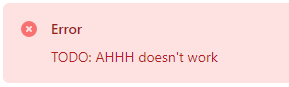
The error messages are funny, but often sparse and unhelpful
This particular one was apparently fixed in v0.3.1
There's not currently a scheme for importing existing code, either in the form of libraries or even static distributions (that wouldn't need to be recalculated on each Autorun), making Squiggle somewhat unwieldly for large projects
It's "missing" basic flow control like for and while, though with a little prodding you can do most everything with List.reduce and SampleSet.map
I also had (and forgot the specifics of) some syntax issues with if/else if/else, but ternary operators worked fine
No idea if I'm using SampleSet properly, but it seems like it should be the default behavior (as opposed to the way "symbolic" distributions currently work)
Consider this example, where a and b represent the same underlying estimate of e.g. yearly returns on an investment, and prod compounds returns for a given dist for n years:
A Squiggle newbie (like me!) might reasonably expect aprod and bprod to be the same, but they are not! (I think this is because a is resampled each time it is invoked, but b is "static" and the same samples are reused?)
Squiggle does a few other "weird" things under the hood, like interpreting arr[-0.5] as arr[0] without a warning
Both in the VS Code extension and the Plaground, it would be great if settings persisted between sessions (this, combined with default Autorun, was a major pain point)
Related, it seems like you can only have one "active" preview open in VS Code at a time, and switching between previews resets settings
Also in the VS Code extension, the syntax highlighting is occasionally broken in ways that don't seem entirely fixed by this method (copy/paste my linked model to see some examples)
I found a few other randombugs, but was able to work around them for the most part
Overall, Squiggle is a really promising tool, and it is basically ready to go for small projects
I'm grateful to the QURI team for its development, and look forward to using it again in the future!
Crossposted to Less Wrong
‘Like most of life’s dangers, the dangers of artificial intelligence are not easily identified from the armchair.’
J Dmitri Gallow
Epistemic status
I’m not an expert in this field, and herein I make some sweeping generalisations educated guesses about the overall...
TL;DR: EA has traditionally deprioritized climate change as a cause area. But a new report from Rethink Priorities, an EA research institute, suggests that specific Earth systems risks driven by climate change could have mortality impacts comparable to major global health burdens, on top of the known damages of climate change.
The report finds that research and governance work on ‘Earth Systems Stabilization’ to establish whether safe options to address th...



I'm really happy to see these detailed suggestions & improvements, they're really useful.
Squiggle is still an early language, there are definitely a lot of fixes for things like these to be done.
Quick question:
> This is the primary reason I wasn't able to completely verify the Squiggle model against Causal
Any harder numbers here would be really useful, to get a better sense. I just looked at this model, which takes me a few seconds to render. (This is also too much to be done each keystroke, similar to Squiggle). I'd expect Squiggle to be slower than Causal (for one, Squiggle is much newer and not a startup), but I'm of course curious how much it is.
Calculating up to
annually_averted_health_dalys_time_discountedwas taking me well over a minute in v0.3.0, but is down to ~5 seconds in v0.3.1--a big improvement!I originally had to comment the actual model output (
dollars_per_daly_equivalents_averted(20)) because it wouldn't return at all in v0.3.0, but now it's ~2 mins in v0.3.1.For reference, the whole Causal model takes ~5 seconds to update.
Now down to 1 min (55 seconds) in v.4. My guess is it's the maps and reduces, we should look whether we can optimize their implementation.
I also noticed that your definition of the "clip" function was fairly inefficient. If you use the built-in "truncate" function instead, time is shaved to 15 seconds in the latest version.
Happy to report that it's now ~3s using the truncate function, and ~7s using the original code (though they have slightly different functionality, one crops the function and the other one moves all the points outside the range into the nearest point in the range).